

Jump to content

1 Screenshot

About This File

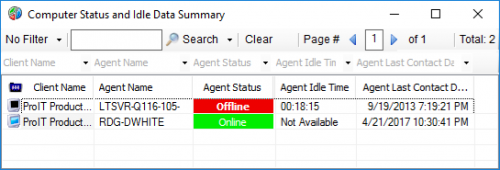
This Dataview is basically the same as the "Computer Status" Dataview, but I have added a column for Agent Idle Time. I find it helpful when I need to see quickly which users are on their systems, and which machines are not being used or have long idle times so that I can work without disrupting an active user. I have added another column, `Agent Additional Users`. This shows any other logins reported by Automate, such as on a Terminal Server.  For only a couple of columns difference, I have found it to be a very useful dataview and refer to it often.

To import, just extract the .sql file from the zip. In Control Center select Tools->Import->SQL File. It will ask if you want to import 3 statements. This is normal.

When finished, select Tools->Reload Cache.

 

  • Thanks 7

User Feedback

Recommended Comments

montanatech

Posted

Hello,

I've been trying to figure out how to import this in Automate 12??  Sorry if this is a simple question.

montanatech

Posted

And I click submit and found the Import under General.  Sorry.

wnichols

Posted

Darren - is there a way to have the Agent Idle field selectable on other dataviews?  Also - is there a way to change the value where it shows "Not Available" to show "Active" instead?  I've noticed almost all of the Not Available items are active machines but I don't know if that is 100% true.

Join the conversation

You can post now and register later. If you have an account, sign in now to post with your account.

Guest
Add a comment...

×   Pasted as rich text.   Paste as plain text instead

  Only 75 emoji are allowed.

×   Your link has been automatically embedded.   Display as a link instead

×   Your previous content has been restored.   Clear editor

×   You cannot paste images directly. Upload or insert images from URL.

×
×
  • Create New...